![daasity_icon_RGB_On_White.jpg]](https://support.daasity.com/hs-fs/hubfs/daasity_icon_RGB_On_White.jpg?height=40&name=daasity_icon_RGB_On_White.jpg)
Why?
If you see a NULL, it means that the SKU that exists in order_line_revenue doesn’t exist in sku_attributes. Note that order_line_revenue comes from the order item data and sku_attributes comes from the product data. So if you delete a product it won’t join as defined product.
In case if SKU is missing, Daasity will replace blank SKU with "tmp12345678901234" and group it up with the NULL (∅) sign, still counting sales for undefined product.
To avoid this happening, simply unlist the merchandise without actually removing it.
How to tag your SKUs
To have SKUs appear as a defined product data, instead of ∅, you must add SKU numbers to your product variants from in Shopify admin.
-
From your Shopify admin, go to Products > All products.
-
Click on the product that you would like to edit.
-
For products with multiple variants, in the Variants section, add your SKU numbers:
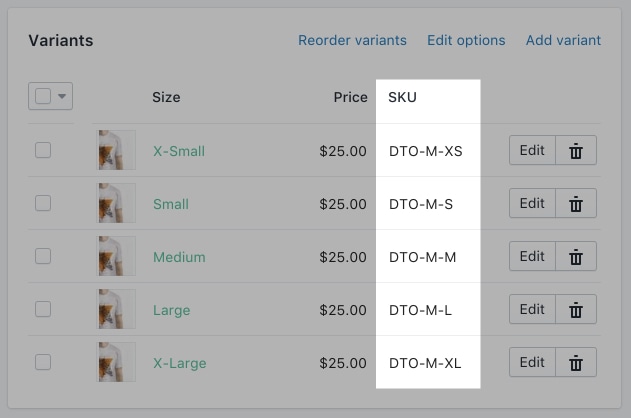
For products without variants, in the Inventory section, add your SKU number: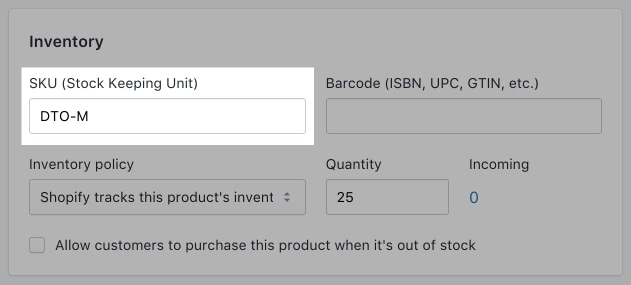
You're all set!
After the data is refreshed - SKUs will be defined respectively after the next update.